
Buying Google One subscriptions because of lack of web space? hidden tax, “artificial limitation” or a “sales funnel strategy,” of Google to makes you buy more services from them. One example is the e-mail bellow.
Gmail Duplication Bug caused by an idempotency failure Tripled Your Email’s Storage Size
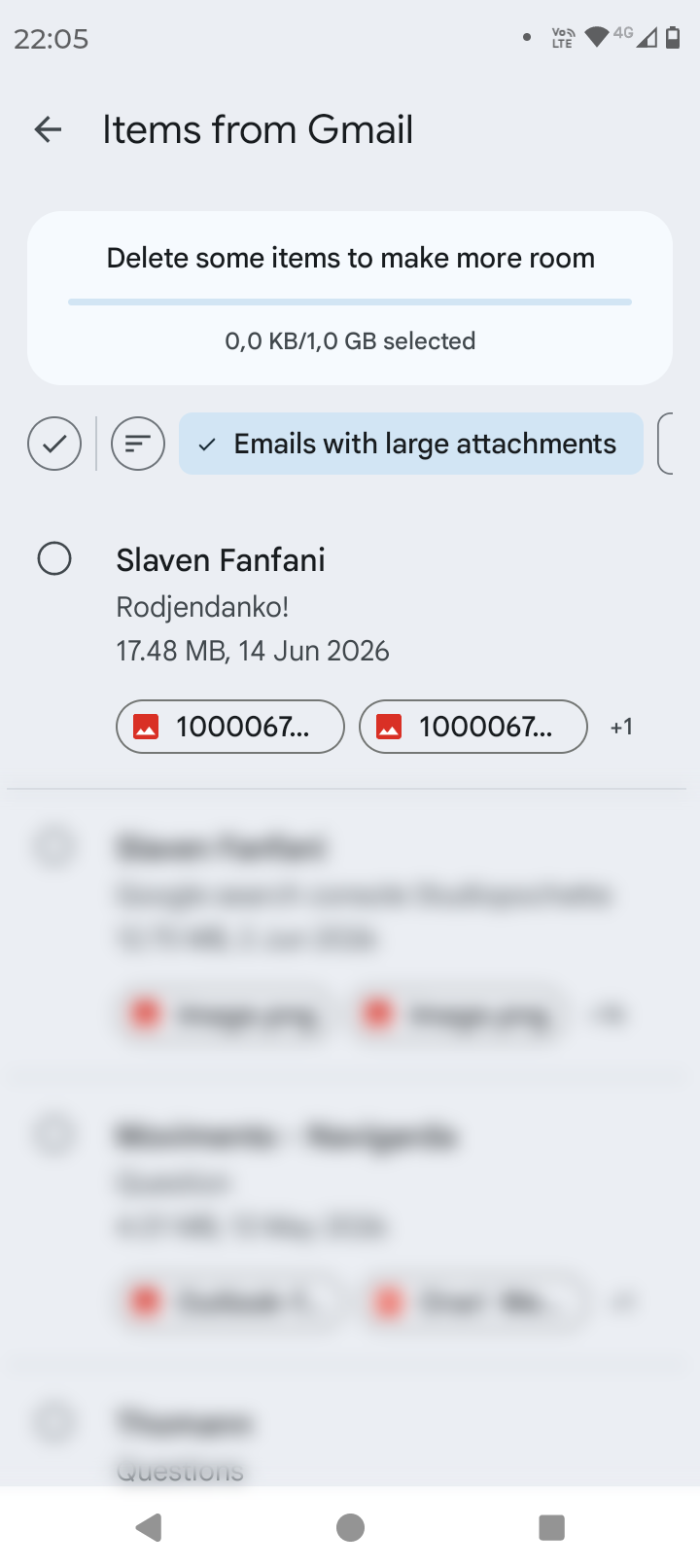
While auditing my storage using Google One’s Clean Up feature, I noticed a single email thread taking up an astonishing 17.48 MB. Yet, when downloading the exact same photo attachment, its true size was only 5.83 MB. Why the massive discrepancy?
Google One storage management
Gmail is Quietly Tripling Your Photo Sizes (And Eating Your Storage). Google Clean up space feature showed e-mail is taking 17 mb
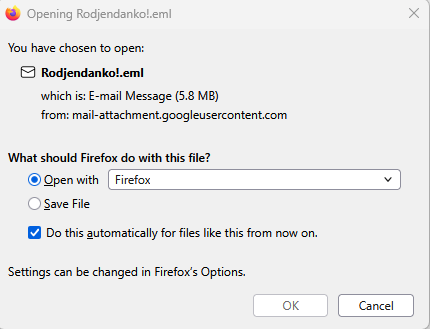
When downloaded this same exact e-mail the size is 5.8mb
How to call this gmail “feature” of Duplication Bug?
- “Raw MIME content” / “Message Overhead”: Google specifies that your storage quota is calculated based on the total raw text string of the email package stored on their hard drives.
- “Unified Storage Quota”: This is Google’s official name for the system that pools your Gmail, Google Drive, and Google Photos into one single bucket. Because everything is linked, a few “inflated” emails can easily freeze your entire cloud drive or photo backups.
- “The Free Storage Squeeze”: A broader term for the feeling that Google makes it intentionally difficult to stay under the free 15 GB limit (or the newer 5 GB limits being tested in 2026) by counting hidden code overhead against your personal quota.
- “Ghost Data”: A term used by users to describe storage space being eaten up by “nothing”—meaning you can’t see why an email is that large, but you are still forced to pay for it.
- “Storage Inflation” / “Size Bloat”: Refers to how data mysteriously swells up the second it enters the Google ecosystem.
Why this occur?
This glitch tied directly to how the Gmail app handles the “Photos” insertion option. Here is what causes the triple-duplication:
- The Draft Auto-Save Glitch: When you insert an image inline as a “Photo,” the Gmail app tries to upload it immediately to the body of the message. However, if the app auto-saves a draft while you are still selecting or inserting the image, the background sync gets confused. It treats the second auto-save as a brand-new image instead of overriding the first one.
- The “Display + Attachment” Double-Up: Because it’s an inline image, Gmail’s system often saves one copy to show inside the text code, a second copy cached for mobile rendering, and a third copy attached as a raw backup file so the recipient doesn’t lose it if their phone can’t read inline HTML.
The root cause.
By changing your workflow to use Paperclip ➔ Files, you prevent Gmail from trying to render the image inline, which stops the background auto-save script from duplicating your files!
Why the button “add attachment” is inline elements like this pic?
The button behaves this way because of a poor User Interface (UI) design choice by Google.
Instead of keeping the “Photos” and “Files” buttons completely separate, Google bundled them under the same single paperclip “Attachment” menu. Because they grouped an inline layout tool (“Photos”) inside an attachment menu, it confuses the system—and the user—by making an inline action look like a regular file attachment.
This is the desktop version “clean up” size of the e-mail

I will delete my e-mail from sent
After deleting sent i get a note “This message has been deleted. Restore message” the pic is still visible.
What did i delete when all is presented and visible?
Message deleted from SENT and BIN

All the data is still there in inbox.
Three identical copies of the image in the e-mail
The size was so big at first because the Gmail app glitched during its background auto-save process and quietly attached three identical copies of your 5.8 MB photo to that single sent email.
Why this is good for Google?
This layout benefits Google for two main reasons:
- It creates an automatic sales funnel: By making it easier to accidentally duplicate photos, Google rapidly drains your free 15 GB allowance. This pushes you directly into buying a paid Google One subscription.
- It forces ecosystems lock-in: The “Photos” button connects straight to Google Photos rather than your local device storage. This subtly trained behavior keeps you completely reliant on their cloud storage platform instead of your phone’s memory.
Solved. – Gmail app glitched during its background auto-save process and quietly attached three identical copies of 5.8 MB photo to that single sent email.
- check clean up option in Google One storage management
(https://one.google.com/storage/management/gmail/large) - Find the buggy ones
- Discard drafts
- Delete sent (not all, just the one causing this bug)
- empty bin
Privacy Notice: Screenshots and media used in this article contain private data and are intended solely for bug demonstration purposes. I pay google services already. All rights reserved.
Similar problem with a Google photos in size?